Bookable product
Any simple or variable WooCommerce product can be sold as appointments. The setup wizard creates or prepares one for you; for more products, or to fine-tune one, open the product and go to Product data → Slotiva.
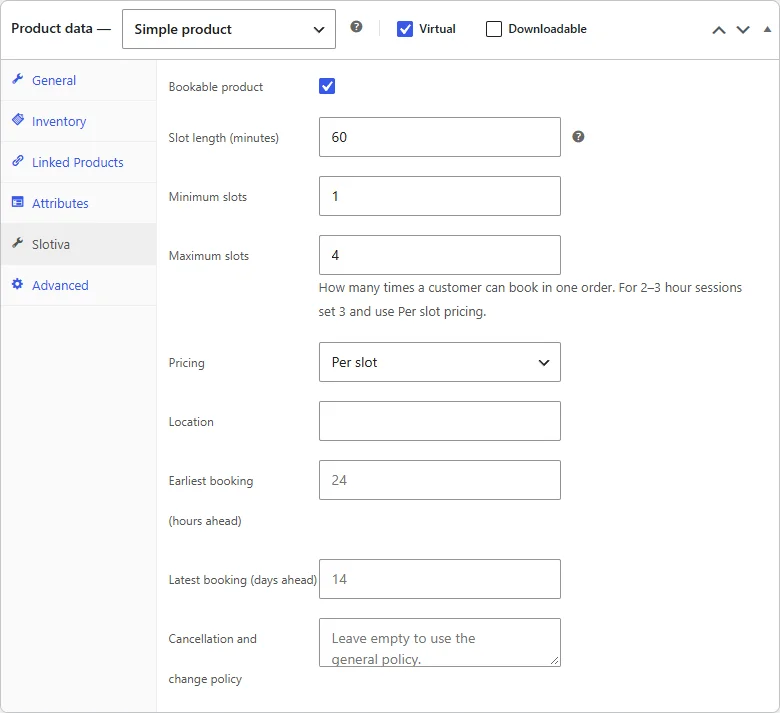
Fields
| Field | What it does |
|---|---|
| Bookable product | Turns booking on for this product. The time picker appears at checkout when it is in the cart. |
| Slot length (minutes) | How long one appointment lasts. A multiple of 15, from 15 to 480 (8 hours). |
| Minimum slots / Maximum slots | How many times a customer can book in one order, from 1 to 10 (minimum ≤ maximum). For 2–3 hour sessions set the maximum to 3 and use Per slot pricing. |
| Pricing | Per slot — the product price is for one time; the cart quantity follows the number of times chosen. Fixed (single slot) — one price for one appointment. |
| Location | Optional. Shown with the appointment (for example an address or "Online"). |
| Earliest booking (hours ahead) | Optional. Leave empty to use the general rule on Slotiva → Working hours. |
| Latest booking (days ahead) | Optional, 1 to 62. Leave empty to use the general rule. |
| Cancellation and change policy | Optional. Leave empty to use the general policy from Slotiva → Settings. |
If a value is not valid (for example a length of 50 or 600 minutes), WooCommerce shows an error at the top of the product page — for the length: Slotiva: the slot length must be a multiple of 15 minutes (15 to 480). — and none of the Slotiva fields are saved, so the product keeps its previous settings.
Price
The price is the product's normal WooCommerce price. With Per slot pricing it is the price of one time: a customer who books three times pays three times the price. A price of 0 is allowed (for example a free first consultation).
All bookable products at a glance
Slotiva → Settings → Bookable products lists every bookable product with its length, hours per order and pricing, and links to each product's Slotiva tab.